
Database
The way of storage of this project is a MariaDB database. Data of which is saved in a structured way which can be seen below.
Note
In the final product, we only use the Question and Answer table. The other tables are for features which we did not fully implement. They are still included to be included later on.
ERD
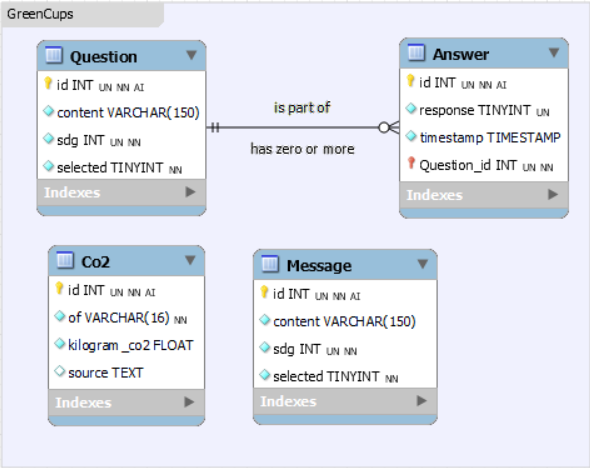
For this version of the database, we have one table which contains answers. This stores the response, so yes or no. It also automatically adds a timestamp in UTC, to track when the interactions take place.
We also have a table for questions. Here the content or text of the question is stored. It also has a column for which SDG (sustainable development goal) it relates to. Lastly it has a column for if it is selected, this means if the current question is displayed on the device. A question can have zero or more answers, and an answer can only be assigned to one question.
Next to this there is a CO2 table. This tracks what the CO2 output is for specific things, like cup creation. kilogram_co2 says how much CO2 the thing in the of column produces.
Another table is for storing messages about each sustainability goal. This table is very similar to the questions table. Messages can include both tips and facts about each SDG. For now however, these are not separated in any way. If we want to do this in the future we can just add a new column. Besides the message and sustainability goal, there is also a field for if the message has been selected or not.
---
title: The latest "GreenCups" database
---
erDiagram

Answer {
    int id
    boolean response
    timestamp timestamp
}

Question {
    int id
    string content
    int sdg
    boolean selected
}

Co2 {
    uint id PK
    varchar(16) of UK "What has this CO2 production?"
    float kilogram_co2
    text source
}

Message {
    int id
    string content
    int sdg
    boolean selected
}

Question ||--o{ Answer : has
Design
To make this design, MySQL Workbench is used. The design can be seen in the picture below:
There is also a stored procedure, called UpdateSelected included in the database design. This takes a question ID as parameter and puts this as selected (1). All other questions are changed to unselected (0).
Usage
Manual database build
To manually build the database, you can make use of MySQL Workbench and repeat the following steps:
Go into your connection in MySQL workbench then:
File -> Open SQL Script
Select the provided SQL scripts in alphabetical order
Then press the lightning symbol to execute the script.
Stored procedure
To use the stored procedure (which is called 'UpdateSelected') for updating a selected question, you can use the following SQL, here question_id is the ID of the question you want to select.
1 | |